Jacket Back Digitizing Services for Flawless Back Panels
Jacket back digitizing services made simple: learn how back-panel files are built, which fabrics need special settings, and what to send us before you order.
 Zdigitizing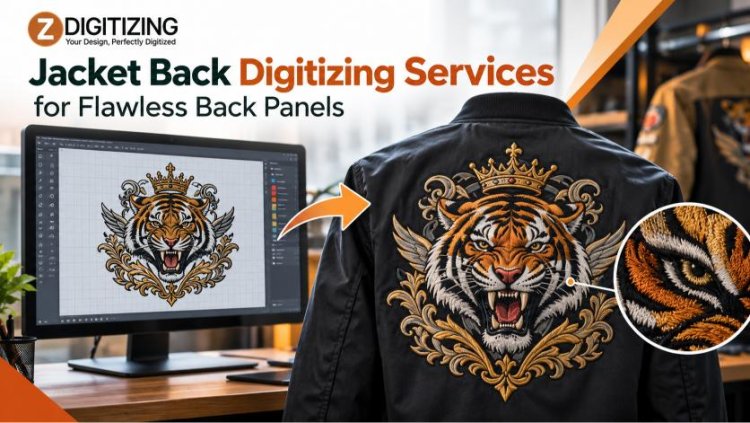
A jacket back is the biggest canvas on most garments, so every stitch decision shows. We prepare Embroidery Digitizing for Jacket Backs so mascots, lettering, and large logos stitch evenly across the panel instead of puckering, gapping, or drifting off center.
At ZDigitizing, we build stitch files for large back-panel designs. This guide explains how Jacket Back digitizing services work, which design elements cause the most trouble, and what you should prepare before you send your artwork to us.
What Are Jacket Back Digitizing Services?
Jacket Back digitizing services convert artwork into an embroidery file sized and structured for the back panel of a jacket. The file is a set of machine instructions. It defines stitch types, stitch angles, density, underlay, trims, color changes, and the order in which each element is sewn.
A pixel image cannot do this job. An embroidery machine needs a stitch file, so every shape in your logo must be translated into thread paths. On a back panel, that translation covers a wide area, which makes planning more important than it is for a small chest logo.
Which Jacket Back Designs Are the Hardest to Digitize?
Some design types need extra care once they are scaled to a full back panel.
Large Fill Areas
Big solid shapes can look flat or patchy if the stitch angle and length are wrong. We vary stitch direction where it helps the thread catch light, and we balance density so the area stays soft enough to wear.
Script and Small Lettering
Thin script and tiny text lose clarity quickly. Satin stitches work for bold letters, but very narrow strokes can fill in. If your lettering is delicate, we may recommend a small adjustment to line weight so the words stay readable.
Multi-Color Mascots
Mascots often combine many colors, overlapping shapes, and fine inner details. Each overlap adds stitches, so the stitch sequence matters. A planned order limits trims and keeps layers from crowding each other.
Outlines and Borders
Outlines frame the design, so gaps between a border and its fill are easy to spot. Pull compensation helps close those gaps by offsetting the way thread tension tugs fabric inward.
How Does Design Size Change the Stitch File?
Size affects nearly every setting in a digitized file. A larger design carries more stitches, and more stitches create more pull on the fabric. That pull can shift outlines, warp straight lines, and leave ripples around the logo.
We account for this in the file by adjusting underlay, compensation, and stitch order. We also check that the design fits inside your machine's embroidery field. If a design is bigger than the field allows, it may have to be resized or planned across more than one hooping, so please share your machine's limits when you place your request.
How Do We Digitize a Jacket Back Design?
Here is the process we follow for a typical back-panel project:
- Review the artwork. We check line weight, text size, color count, and fine detail.
- Confirm size and placement. We size the design for the jacket panel and your hoop.
- Assign stitch types. Fill stitches cover large areas, satin stitches handle borders and bold letters, and running stitches add thin lines.
- Build underlay. Foundation stitches stabilize the fabric before the top stitches go down.
- Apply pull compensation. We adjust shapes slightly to offset thread tension.
- Set the stitch sequence. A logical order reduces jumps, trims, and fabric shifting.
- Export the file. We deliver the design in the format your machine reads.
How Does Jacket Fabric Affect the File?
The same logo can need different settings on different jackets.
- Twill, canvas, and denim: Firm weaves hold dense stitching well, though excess density can still stiffen the panel or cause thread breaks.
- Leather and faux leather: Needle holes can leave permanent marks, so stitch planning needs extra restraint.
- Fleece and softshell: Soft or stretchy fabric can ripple or let stitches sink. Stronger underlay and lighter density usually help.
- Nylon and satin: Slick surfaces can slip in the hoop, so a well-ordered sequence matters.
Stabilizer choice also affects the result. Your production team should select it based on the specific jacket.
What Should You Send Us?
Strong source files lead to stronger results. For Embroidery Digitizing for Jacket Backs, please send:
- A vector file or a high-resolution image of your logo
- The jacket type and fabric
- Your desired design width and height
- Your machine's maximum embroidery field, if you know it
- Thread color preferences, if you have them
- Your machine's embroidery file format
If your image is blurry or has jagged edges, our Vector Art Service can redraw it into clean shapes first. Our Convert Image to Embroidery File service is another option for turning basic image files into stitch-ready designs.
Which Embroidery File Formats Should You Request?
Embroidery machines read specific formats, so confirm yours before ordering:
- DST: Common on commercial multi-head machines
- PES: Used by Brother and Babylock machines
- EXP: Used by Melco machines
- JEF: Used by Janome machines
If you are not sure, check your machine's manual or software. The right format from the start prevents conversion delays.
What Problems Come From a Poorly Built Back Panel File?
Weak files show up quickly on a wide panel. Professional Jacket Back digitizing services help you avoid:
- Puckering: Missing underlay or high density can warp the fabric.
- Visible gaps: Poor compensation leaves spaces between fills and outlines.
- Thread breaks: Overly dense areas strain the needle.
- Crooked alignment: A weak stitch order lets the fabric shift during sewing.
- Muddy lettering: Text that is too small can blend together.
Because jackets are costly to replace, catching these issues in the file is far cheaper than fixing them on finished garments.
How Do Related Digitizing Services Fit In?
Some jacket projects go beyond a flat back design. We offer related services that pair well with back-panel work:
- Back & Sleeve Digitizing for placements beyond the main panel
- Left Chest Logo Digitizing for a matching front logo
- 3D Puff Embroidery Digitizing for a raised look on bold shapes
- Applique digitizing for fabric-layered designs
- Patch Digitizing for patch-style looks
Each effect needs its own file setup, so tell us the look you want from the start. Many orders combine Jacket Back digitizing services with one of these options.
Get Your Back Panel Design Stitch-Ready
A strong jacket back starts with a file built for the panel size, the fabric, and your machine. If your artwork is ready, ZDigitizing can prepare it for production. Send us your logo and project details, and we will help you move forward.
Before running the full order, stitch a test on similar fabric. Paired with Embroidery Digitizing for Jacket Backs that matches your jacket, a quick sample confirms size, density, and alignment, and it helps you trust the Jacket Back digitizing services behind your final file.
Frequently Asked Questions
What are Jacket Back digitizing services?
Jacket Back digitizing services convert your artwork into a stitch file made for large back-panel embroidery. We set stitch types, density, underlay, pull compensation, and sequence, then provide the file in the format your machine reads.
Why can't I use a left chest file on a jacket back?
A left chest file is built for a small area. Back designs are larger and use many more stitches, which increases fabric pull. We adjust underlay, compensation, and sequence for the wider panel so the logo stays clean and balanced.
What artwork works best for jacket back embroidery?
A vector file is ideal, but a clear, high-resolution image also works. Include the jacket fabric, design size, placement, and your machine's format. If your artwork is low quality, we can help rebuild it before digitizing.
Which embroidery file formats can you provide?
We can prepare common formats such as DST, PES, EXP, and JEF. Tell us which machine you use, and we will provide the compatible file so you can load the design without conversion problems.
Can I add a puff or appliqué effect to a jacket back?
Yes. We offer 3D puff embroidery digitizing and appliqué digitizing, and both can work on jacket backs. These effects need specialized file setups, so tell us which look you want when you send your artwork.