The Modern IT Playbook for Deploying and Managing Zebra Devices
Learn how to set up Zebra devices, streamline deployment, manage apps, enforce security, and use web filtering software for business at scale.
 bhushan1301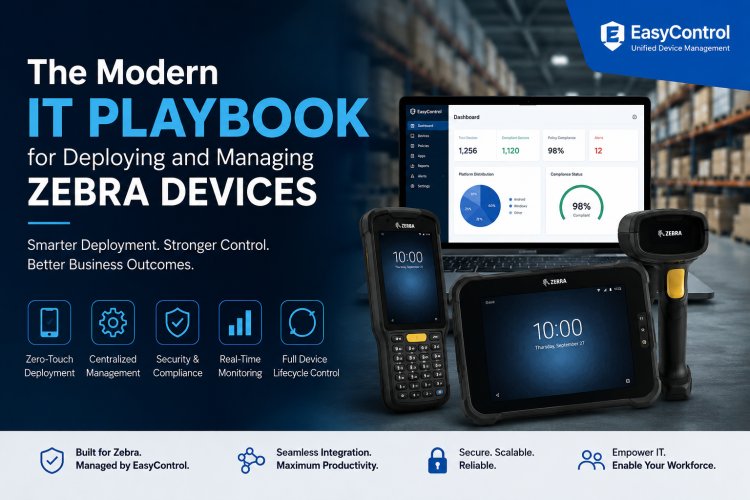
A Zebra device can be ready to scan a barcode in minutes—but getting hundreds of Zebra devices ready for real business operations is a completely different challenge.
Warehouses, retail stores, logistics companies, manufacturing facilities, and field teams rely on Zebra Android devices for mission-critical tasks. But once the fleet grows, manually configuring Wi-Fi, installing applications, applying security policies, and troubleshooting devices becomes slow, inconsistent, and expensive.
That is where a modern deployment strategy comes in.
Instead of treating every Zebra device as an individual piece of hardware, IT teams can combine Zebra StageNow for initial provisioning with an enterprise device management platform such as EasyControl UDM for centralized lifecycle management. Zebra describes StageNow as a staging solution that can create profiles and deploy configurations through methods such as barcode scanning and NFC.
Here is what that modern IT playbook looks like.
Why Zebra Device Deployment Needs a Smarter Strategy
Zebra devices are built for demanding environments. Their rugged hardware makes them ideal for warehouses, retail, transportation, manufacturing, healthcare, and field operations.
But rugged hardware does not eliminate IT complexity.
Imagine an organization deploying 500 Zebra handheld computers across 20 locations. Every device may need:
- Company Wi-Fi configuration
- Business applications
- Security policies
- User or department assignments
- Device restrictions
- Software updates
- Network and access controls
- Monitoring and troubleshooting
Configuring these settings individually creates unnecessary work and increases the possibility of configuration errors.
A standardized deployment process solves this problem by allowing IT administrators to create a configuration once and apply it consistently across the fleet.
Step 1: Prepare Your Zebra Deployment Environment
Before you set up zebra devices, define what each device needs to accomplish.
A warehouse scanner might require inventory and barcode applications, while a retail device may need POS software. A field-service device could require business applications, GPS access, and specific communication tools.
Start by identifying:
- Device models and Android versions
- Required applications
- Wi-Fi and network settings
- Security requirements
- Device groups
- User or department assignments
- Kiosk requirements
- Update policies
This planning stage prevents a common mistake: enrolling devices first and figuring out their configuration afterward.
Step 2: Use Zebra StageNow for Initial Provisioning
Zebra StageNow is designed specifically to simplify the staging of Zebra Android devices.
IT administrators can create profiles that define device settings and deployment actions. Those profiles can then be delivered through mechanisms such as barcodes or NFC. Zebra's documentation also includes Wizards for configuring devices, managing applications, enrolling into an MDM, managing security, performing OS updates, and wiping devices.
This makes StageNow particularly useful during the initial deployment phase.
Instead of repeating the same configuration manually, administrators can create a standardized profile and use it across multiple devices.
Step 3: Connect Provisioning With MDM
StageNow solves an important part of the problem—but deployment does not end after the device is configured.
Once Zebra devices are operational, IT teams still need to manage them throughout their lifecycle.
This is where an MDM or UEM platform becomes valuable.
With EasyControl UDM, organizations can centrally manage enrolled devices, distribute applications, apply policies, monitor device status, configure kiosk restrictions, and support remote administration.
The result is a simple division of responsibilities:
StageNow = Initial provisioning
MDM and UDM = Ongoing management
That combination is much more scalable than relying on manual configuration.
Step 4: Automate Application Deployment
Application management can quickly become one of the biggest headaches in a growing Zebra fleet.
Consider a warehouse with 300 scanners. If an inventory application needs to be updated, manually visiting every device is inefficient.
Centralized application management allows IT administrators to:
- Deploy approved applications
- Push updates remotely
- Remove outdated applications
- Assign applications to device groups
- Standardize application versions
- Reduce unauthorized software
For example, warehouse devices can automatically receive inventory applications, while retail devices receive POS applications.
This creates a more predictable and controlled software environment.
Step 5: Turn Zebra Devices Into Purpose-Built Endpoints
Not every Zebra device needs to provide users with unrestricted access to the entire Android environment.
For task-specific deployments, kiosk functionality can limit devices to approved applications or workflows.
A warehouse scanner, for example, might need to run only an inventory application. A retail device could be restricted to a POS application.
This reduces distractions and limits opportunities for users to change critical settings.
For organizations that also want to control internet access, web filtering software for business can add another layer of protection by restricting access to inappropriate, risky, or unauthorized websites according to organizational policies.
The combination of application restrictions and web filtering can help turn a general-purpose Android endpoint into a controlled business tool.
Step 6: Apply Security Policies Centrally
Security should not depend on whether an individual administrator remembered to configure a device correctly.
A centralized management platform can help standardize policies across the entire Zebra fleet.
Depending on organizational requirements, administrators may control:
- Application installation
- Device settings
- Connectivity options
- Password requirements
- Peripheral access
- USB usage
- Camera access
- Bluetooth
- Kiosk restrictions
- Network access
Zebra's StageNow documentation itself includes security-oriented configuration capabilities such as application whitelisting/blacklisting and controls for device features.
The goal is consistency: a device deployed in one warehouse should follow the same baseline security policy as another device performing the same role elsewhere.
Step 7: Monitor Devices After Deployment
Deployment is only the beginning.
Once Zebra devices are distributed across warehouses, stores, or field locations, IT teams need visibility into their operational status.
Centralized device monitoring can help administrators identify:
- Offline devices
- Low battery conditions
- Storage problems
- Configuration issues
- Application problems
- Policy violations
- Devices requiring updates
Instead of waiting for an employee to report that a device is not working, IT teams can identify problems proactively.
That shift—from reactive support to proactive monitoring—is one of the biggest advantages of centralized device management.
Step 8: Manage Devices Remotely
A Zebra device might be sitting hundreds of kilometers away from the IT department.
Sending technicians to every location whenever a configuration needs to change is expensive and inefficient.
Remote management allows administrators to make supported changes from a centralized console.
For example, an administrator may need to:
- Update a business application.
- Change a device policy.
- Assign a device to a different group.
- Apply a new configuration.
- Troubleshoot a device remotely.
- Restrict access to specific functionality.
Instead of physically handling every endpoint, IT teams can manage much of the fleet remotely.
A Practical Example: 500 Zebra Devices Across Multiple Warehouses
Consider a logistics company deploying 500 Zebra handheld computers across 10 distribution centers.
Traditional approach
Each device is configured individually.
Wi-Fi settings are entered manually. Applications are installed one by one. Security settings are configured separately. Troubleshooting requires local assistance.
The result?
More IT hours + inconsistent configurations + slower deployment.
Modern approach
The organization creates standardized StageNow profiles, provisions the Zebra devices, enrolls them into EasyControl UDM, and assigns them to appropriate device groups.
From there, applications and policies can be managed centrally.
The result is a repeatable workflow:
Provision → Enroll → Configure → Secure → Monitor → Maintain
That is the foundation of scalable Zebra device management.
Common Mistakes to Avoid
Even a strong deployment strategy can fail if organizations overlook the basics.
Avoid:
1. Configuring Every Device Differently
Standardize configurations wherever possible.
2. Installing Apps Manually
Use centralized application deployment for repeatable installations and updates.
3. Ignoring Device Groups
Organize devices by location, department, role, or use case.
4. Treating Deployment as a One-Time Task
Devices require continuous monitoring, updates, security enforcement, and maintenance.
5. Leaving Internet Access Uncontrolled
For business-owned devices, consider appropriate web filtering software for business to control unnecessary or risky web access.
6. Forgetting Remote Support
Distributed Zebra fleets should be designed around remote administration from day one.
The Bigger Picture
The real challenge is not simply learning how to set up zebra devices.
The challenge is building a deployment model that continues to work when the fleet grows from 10 devices to 100, 500, or several thousand.
Zebra StageNow provides a practical way to simplify initial staging and provisioning, while a centralized MDM/UDM platform can take over ongoing management. Zebra's current documentation also describes capabilities for MDM enrollment, application management, security configuration, OS updates, and Zero Touch workflows.
For IT teams, that means less repetitive configuration, greater consistency, stronger control, and a much more manageable device lifecycle.
AlsoExplore: Microsoft Intune Alternative
Final Takeaway
Zebra devices are built to make frontline operations faster. Your IT management strategy should do the same.
Instead of managing every scanner, tablet, or mobile computer as a separate endpoint, create a standardized deployment workflow using StageNow + centralized device management.
Provision devices efficiently. Enroll them automatically. Deploy applications centrally. Enforce security policies. Control web access. Monitor device health. And troubleshoot remotely.
That is what modern Zebra device management looks like—and it is the difference between simply deploying devices and building a scalable enterprise device strategy.