Professional Video Conferencing Installation | Design & Network
Expert guide to professional video conferencing installation: room design, acoustics, cameras, mics, displays, network QoS, simple controls, commissioning and lifecycle support for reliable hybrid meetings
 karenavila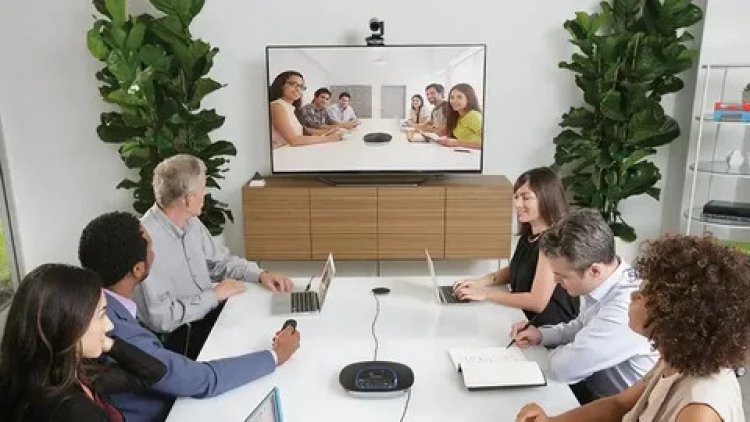
A successful Professional video conferencing installation transforms a room from an occasional, frustrating meeting space into a reliable collaboration hub where people join on time, remote participants feel present, and presenters focus on content rather than cables. A professional video conferencing installation is systems work: room acoustics, video capture, microphone strategy, displays and content workflows, robust network design, intuitive controls, and ongoing operational support. When these elements are engineered together, the room becomes an asset that improves productivity and reduces meeting friction.
Begin with clear outcomes, not just a device list
Any worthwhile professional video conferencing installation starts by defining outcomes. Who uses the room, how many people does it host, and what types of meetings are typical? Is the space for quick huddles, recurring team standups, client presentations, or high-stakes external broadcasts? Each use case drives different hardware and workflow choices: small rooms benefit from all-in-one video bars, mid-size rooms often need dedicated cameras and ceiling arrays, and executive boardrooms may require multi-camera switching, broadcast-grade audio, and redundancy. Defining outcomes first prevents buying gear that looks impressive on paper but fails in real use.
Room acoustics and lighting: the invisible high-value work
People underestimate how much the room itself affects perceived call quality. Hard, reflective surfaces produce reverberation that blurs speech; poor lighting throws faces into shadow, making remote participants disengage. A professional video conferencing installation assesses acoustics and lighting and specifies modest treatments—absorption at first-reflection points, ceiling clouds, and adjustable, flicker-free lighting—to create consistent, usable video and intelligible audio. These investments are often a fraction of equipment costs but multiply the value of cameras and microphones.
Video capture strategy: cameras, framing, and multi-view workflows
Choosing the correct camera approach is essential. For huddle rooms a single wide-angle camera may suffice; for larger spaces a multi-camera setup or a motorized PTZ is often necessary to capture speakers, presenters, and whiteboards without forcing people to cluster around a single microphone. A good professional video conferencing installation defines camera framing for typical seating positions, plans camera presets for common use scenarios, and ensures switching or auto-framing logic serves meeting goals. Consider portrait and landscape needs, sightlines to whiteboards, and how remote participants will see the room—clarity of view matters more than headline megapixels.
Microphones and audio processing: capture every voice naturally
Microphone placement and audio processing are the parts of a professional video conferencing installation that most directly affect conversation flow. Ceiling arrays with beamforming can capture multiple talkers with low visual impact, while table microphones or distributed boundary mics suit smaller rooms. DSP tuning—automatic gain control, echo cancellation, and noise reduction—must be configured for the room to avoid artifacts that frustrate remote participants. Speaker placement and AEC tuning are part of this work: if local speakers bleed into the mics, conversations loop or become unusable.
Displays and content sharing: make content effortless to see
Display strategy should match the room’s purpose. Small rooms often work well with a single display that shows the gallery and shared content; larger rooms usually need dual displays—one for remote participants and one for slides or whiteboards. Ensure content sharing is simple: wired HDMI inputs for presenters, wireless casting for BYOD convenience, and a confidence monitor so presenters know exactly what remote users see. A professional video conferencing installation tests all sharing modes and documents the preferred workflow to eliminate the “which cable/adapter do I use?” moment.
Network, QoS, and reliability: the backbone of repeatable calls
Video conferencing is network-first work. A professionally installed system isolates AV devices on a dedicated VLAN, reserves bandwidth and enforces QoS policies for RTP streams, and prefers wired backhaul for codecs and room endpoints whenever possible. For critical rooms, consider redundant uplinks or cellular failover to maintain meetings during ISP outages. A good professional video conferencing installation includes tests for concurrent call scenarios, measures jitter and packet loss under load, and provides minimum bandwidth recommendations per room.
Control systems and user experience: simplicity wins
Adoption succeeds when rooms are easy to use. The control surface of a professional video conferencing installation—touch panel, wall button, or a single “start meeting” action—should make the common tasks one-touch: join scheduled meetings, share content, mute/unmute the room, and switch camera presets. Design for occasional users and guests with clear on-screen prompts and a printed quick-reference card in the room. Automations like “auto-join with calendar” or “auto-power on when HDMI connected” remove friction and increase usage.
Commissioning: validate the real-world experience
Commissioning is where a professional video conferencing installation proves itself. Commissioning goes beyond powering up equipment: audio walk tests from every seat, camera framing verification for all typical presenter positions, content-sharing trials (wired and wireless), echo and noise checks, network QoS verification, and a final user-acceptance session with real workflows. The commissioning report documents measured audio levels, camera angles, firmware versions, and pass/fail outcomes—this becomes the baseline for future support and upgrades.
Security, firmware, and device lifecycle management
AV endpoints are networked devices and must be managed securely. A professional video conferencing installation includes secure device provisioning, placement of endpoints on segmented networks, enforced strong administrative credentials, and a staged firmware update policy that tests updates on pilot devices before broad rollout. Maintain an inventory of serials, MACs, and firmware versions so security updates and recalls are trackable. Managed monitoring and remote diagnostics are sensible add-ons to catch problems before users notice.
Training, documentation, and operational support
Even the smartest setup can fail without good handover. Provide short role-based training for room users and admin staff, a concise operations manual, and a one-page troubleshooting guide in the room. Offer an escalation path and support SLAs—knowing who to call and how fast they respond reduces meeting downtime. A professional video conferencing installation often pairs initial training with a 30-day follow-up to tune UX after real users have stressed the system.
Measuring success and continuous improvement
Track adoption, call quality metrics, and user satisfaction as KPIs. Use analytics from conferencing platforms and network telemetry to identify recurring issues—poor audio during certain meeting types, frequent content-sharing problems, or chronic network congestion. A professional video conferencing installation includes periodic reviews and iterative tuning (acoustics, camera angles, firmware policies) so the rooms remain reliable as use patterns evolve.
Budgeting and ROI: invest where it matters
The highest ROI in a professional video conferencing installation comes from investing in the room’s fundamentals—acoustics, network, and commissioning—rather than the flashiest camera. Good design reduces wasted hours in meetings, reduces travel costs, and improves external impressions for client-facing calls. Prioritize durable infrastructure (cabling, power, and racks) and a maintenance plan; these choices reduce long-term operational costs and keep rooms functional for years.
Final thoughts
Professional video conferencing installation is not a one-off equipment sale—it's systems engineering that blends human-centered design with technical rigor. Start with outcomes, invest in acoustics and network resilience, choose cameras and microphones appropriate to room scale, simplify controls, and insist on thorough commissioning and operational support. When you treat rooms as integrated systems rather than collections of devices, meetings become predictable, productive, and painless.